If you spend most of your working day at a keyboard and your wrists are starting to complain, you are not alone. Standard flat keyboards force your hands into an unnatural position — wrists pronated, fingers reaching — and over months or years, that adds up.
The good news is that a better keyboard can make a real difference. We have tested the most popular ergonomic options available in the UK to find the ones that genuinely help with wrist pain, not just the ones that look the part.
What to Look for in a Keyboard for Wrist Pain
Before diving into specific picks, it helps to understand what actually reduces wrist strain:
- Split or curved layout — Allows your hands to sit at a natural shoulder-width angle rather than cramped together in the centre. This reduces ulnar deviation, one of the main contributors to wrist discomfort.
- Negative tilt or tenting — A slight downward slope toward the front keeps your wrists in a neutral position. If your keyboard has flip-out feet on the back, stop using them — they make things worse.
- Built-in wrist rest — A cushioned palm rest at the right height means your wrists are supported without bending upward.
- Low-profile keys — Less finger travel means less strain on the tendons running through your wrist.
Our Picks
Best Overall: Logitech ERGO K860
The K860 is the keyboard most recommended by ergonomic consultants in the UK for good reason. Its curved, split design angles each half of the keyboard outward, letting your hands sit naturally rather than twisting inward. The integrated wrist rest is firm enough to support without being uncomfortable, and the whole keyboard sits at a gentle negative tilt.
The key travel is satisfying without being heavy, so you do not need to hammer each keystroke — something that matters when your wrists are already sensitive. It connects via Bluetooth or the included USB receiver and works across Windows, Mac, and Linux.
It is not a mechanical keyboard and the keys are membrane, which some people find too mushy. But for pure comfort and wrist pain relief, nothing else at this price comes close.
Price: Around £120
Best Budget: Logitech Wave Keys
If you want the wave-shaped comfort without spending over £100, the Wave Keys is the one to look at. It uses a gentler version of the same curved layout as the K860 — not a full split, but enough of an angle to take pressure off your wrists.
The palm rest is built in and cushioned, and the keys have a satisfying low-profile feel. It is compact enough to leave room for your mouse without reaching, which is another common source of shoulder and wrist strain.
The trade-off is that the curve is subtler, so if your wrist pain is severe, you might need the more aggressive split of the K860 or a true split keyboard. But for mild to moderate discomfort, this is a great starting point.
Price: Around £64
Best Budget Split: Arteck Split Ergonomic Keyboard
A split layout at a price that does not sting. The Arteck is a one-piece keyboard with the keys divided into two angled groups, so your hands sit apart and turned slightly outward rather than cramped together in the centre. It comes with a cushioned wrist rest and connects wirelessly via 2.4G.
The build quality is plastic and the key feel is basic, but it gives you the wrist angle of a split layout for far less than a premium board. The split is fixed, so you cannot change the gap or the angle. If you have never tried a split layout before, this is a low-risk way to find out whether it helps your wrists before committing to something pricier.
Price: Around £57
Best Premium Mechanical: Keychron Q10 Max
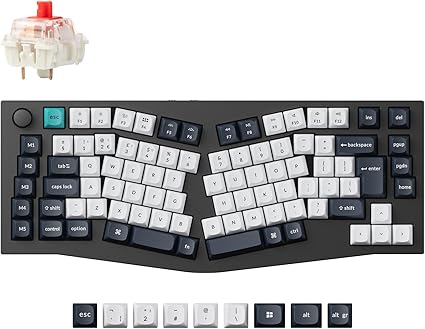
For those who want mechanical key feel without sacrificing ergonomics, the Q10 Max uses an Alice layout — a single board with an angled split down the middle. It is the best of both worlds: the typing satisfaction of a mechanical keyboard with a layout designed to reduce wrist strain.
The UK ISO version means you get the keys where you expect them, and the hot-swappable switches let you choose exactly how heavy or light you want each keystroke. The aluminium build is solid and weighty, so it stays put on your desk.
The Alice layout does take a few days to adjust to, and at over £200 it is a serious investment. But if you are a developer, writer, or anyone who types all day and refuses to give up mechanical keys, this is the one.
Price: Around £210
Quick Comparison
| Keyboard | Price | Type | Best For |
|---|---|---|---|
| Logitech ERGO K860 | ~£120 | Curved split, membrane | Most people with wrist pain |
| Logitech Wave Keys | ~£64 | Wave curve, membrane | Budget-friendly comfort |
| Arteck Split | ~£57 | Fixed split, membrane | Trying split layout cheaply |
| Keychron Q10 Max | ~£210 | Alice layout, mechanical | Mechanical keyboard fans |
Other Things That Help
A keyboard alone will not fix wrist pain if the rest of your setup is working against you. A few things worth checking:
- Desk height — Your forearms should be roughly parallel to the floor when typing. If you are reaching up or angling down, adjust your chair or desk.
- Mouse position — Keep your mouse close to your keyboard so you are not reaching sideways. A compact or tenkeyless keyboard helps with this.
- Take breaks — No keyboard, however ergonomic, replaces getting up and moving. Even a few minutes every hour makes a difference.
- See a professional — If your wrist pain is persistent, see a GP or physiotherapist. A keyboard is a tool, not a treatment.
The Bottom Line
For most people dealing with wrist pain at their desk, the Logitech ERGO K860 is the best place to start. It is comfortable from day one, widely available in the UK, and does not require relearning how to type. If budget is tight, the Wave Keys offers a gentler version of the same concept. And if you want to go all in on ergonomics with a mechanical feel, the Keychron Q10 Max is worth every penny.