"Split keyboard" covers three quite different things, and most of the disappointment people have with them comes from buying the wrong kind. A £35 board with a gap down the middle and a £590 pair of contoured halves are both sold as split keyboards, but they solve the problem to very different degrees and ask very different things of you.
This guide sorts the split keyboards you can buy in the UK into those three types, says who each one suits, and flags the detail that catches UK buyers out most often: whether you can get it with a proper UK ISO layout.
If you are choosing a keyboard because your wrists already hurt, start with our guide to the best keyboard for wrist pain. For curved and conventional options as well as splits, see the full ergonomic keyboards guide.
The Three Types of Split Keyboard
Fixed split (one piece)
The keys are divided into a left and a right group, angled outwards, on a single body. You cannot change the gap or the angle. This is the easiest type to move to, because every key is roughly where your fingers expect it and most people are back to full speed within a few days. It fixes the inward bend of the wrists, but not the width of your shoulders.
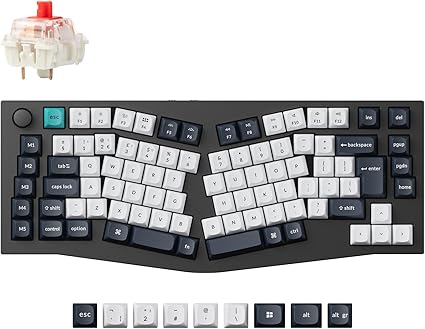
Alice layout
A fixed split in a compact mechanical body. The two key groups are rotated outwards with a small gap between them, and there is usually a split spacebar. It gives you the same wrist benefit as a fixed split with mechanical switches and a much smaller footprint.
True split (two pieces)
Two separate halves, placed wherever you like. This is the only type that lets you set the halves at shoulder width, so your upper arms hang straight down instead of angling inwards. It is also the only type where you can rotate or tent each half independently. The trade-off is a longer adjustment period, and if you ever cross hands to hit a key on the "wrong" side, a true split will make you stop.
Our Picks
Best first split keyboard: Logitech ERGO K860
Type: Fixed split, membrane | Around £85
The Logitech ERGO K860 is the sensible place to start for most people. The key bed is both split and domed, so your wrists straighten and your forearms rotate slightly outwards at the same time. The cushioned palm rest is built in, and the feet sit at the front rather than the back, which tilts the keyboard away from you and keeps your wrists from bending upwards.
It connects by Bluetooth or the included USB receiver, pairs with three devices, and is sold in a UK layout. The keys are membrane, so do not expect mechanical feel.
Best for: Anyone moving from a standard keyboard who wants the least disruption.
Best budget split: Perixx PERIBOARD-512
Type: Fixed split, membrane, wired | Around £35
The Perixx PERIBOARD-512 is the cheapest way to find out whether a split layout suits you. It is a one-piece curved board with an integrated palm rest, a full number pad and a UK QWERTY layout, and it works over a plain USB cable with no drivers on Windows, macOS and Linux.
It is wide at 485 mm, which pushes your mouse further out to the right, and the membrane keys are functional rather than pleasant. At this price neither is a surprise.
Best for: Testing the idea before spending real money.
Best budget wireless split: Arteck Split Ergonomic Keyboard
Type: Fixed split, scissor switch, 2.4G wireless | Around £57
The Arteck Split Ergonomic Keyboard is the wireless step up from the Perixx. It keeps the one-piece split shape and cushioned palm rest, swaps the long-travel membrane keys for quiet low-profile scissor switches, and recharges over USB-C with a battery that lasts months between charges.
Two limits to know about: it connects only through its USB receiver, with no Bluetooth, and it is built for Windows.
Best for: A quiet, cable-free split keyboard for a Windows desk.
Best for a separate number pad: Microsoft Sculpt Ergonomic Desktop
Type: Fixed split, membrane, 2.4G wireless | Around £100
The Microsoft Sculpt Ergonomic Desktop has a domed, split key bed with a cushioned palm rest, and it comes as a set with a separate number pad and a mouse. The separate number pad is the reason to choose it. With the pad moved out of the way, the keyboard itself is compact, so your mouse sits much closer to your body than it can beside a full-size board.
Best for: People who need a number pad sometimes, but not between their keyboard and mouse all day.
Best Alice layout: Keychron Q10 Max
Type: Alice, mechanical, Bluetooth / 2.4G / USB-C | Around £210
The Keychron Q10 Max puts an Alice layout in a heavy aluminium case with hot-swappable mechanical switches and full QMK remapping. It is available in UK ISO, which is not a given with Alice boards, and it works wirelessly or wired.
Because it is one piece, there is nothing to set up and nothing to drift out of position. You get the wrist angle of a split keyboard in a footprint smaller than a standard full-size board.
Best for: Mechanical keyboard fans who want a split angle without two separate halves.
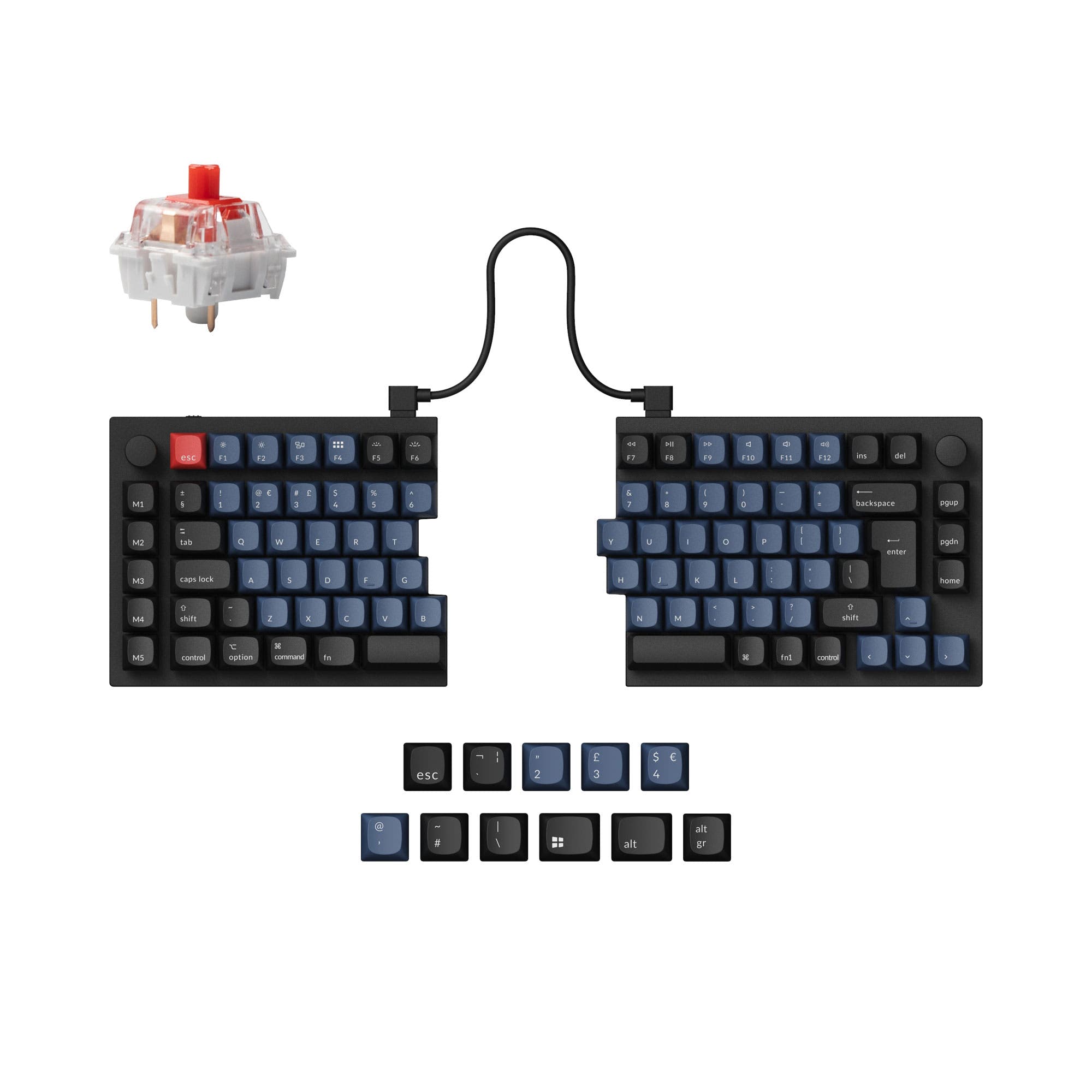
Best true split: Keychron Q11
Type: True split, mechanical, wired | Around £198
The Keychron Q11 is a 75% mechanical keyboard cut cleanly in two. Each half is a solid block of machined aluminium, joined by a cable, and you place them as far apart as your shoulders want. The layout is otherwise completely conventional, with staggered rows and every key where you expect it, which makes it by far the easiest true split to learn.
It is sold in UK ISO, with hot-swappable switches, QMK and VIA remapping and a rotary knob on each half. It is wired only, and there is no tenting kit or wrist rest in the box, so budget for both if you want them.
Best for: Getting a true split at shoulder width without relearning how to type.
Best contoured split: Kinesis Advantage360 Professional
Type: True split, contoured, mechanical, Bluetooth | Around £587
The Kinesis Advantage360 Professional goes further than any other keyboard here. The two halves are fully wireless, with no cable between them. The keys sit in concave wells in straight columns, so each finger moves up and down rather than diagonally, and Enter, Space and Backspace move to thumb clusters. Three tenting heights are built in.
It is a serious commitment. Expect one to four weeks before you type comfortably, and note that it is ANSI layout only. There is no UK ISO version, so the Return key is the short American shape and there is no printed £ key. Everything can be remapped in the ZMK firmware, but if you want UK legends out of the box, this is not the board.
Best for: Heavy typists with existing strain who are prepared to relearn.
How They Compare
| Keyboard | Price | Type | Switches | Connection | UK layout |
|---|---|---|---|---|---|
| Logitech ERGO K860 | ~£85 | Fixed split | Membrane | Bluetooth / USB receiver | Yes |
| Perixx PERIBOARD-512 | ~£35 | Fixed split | Membrane | USB wired | Yes |
| Arteck Split | ~£57 | Fixed split | Scissor | 2.4G receiver | Check listing |
| Microsoft Sculpt | ~£100 | Fixed split | Membrane | 2.4G receiver | Check listing |
| Keychron Q10 Max | ~£210 | Alice | Mechanical | Bluetooth / 2.4G / USB-C | Yes (ISO) |
| Keychron Q11 | ~£198 | True split | Mechanical | USB-C wired | Yes (ISO) |
| Kinesis Advantage360 Pro | ~£587 | True split, contoured | Mechanical | Bluetooth | No (ANSI only) |
Prices move, so check the current figure on each product page.
Which Type Should You Buy?
- You have never used a split keyboard: a fixed split. The K860 if you can stretch to it, the Perixx if you want to spend as little as possible.
- Your shoulders and upper back are the problem, not just your wrists: a true split. Only two separate halves let you open your arms to shoulder width.
- You want mechanical switches and a tidy desk: the Q10 Max.
- You look at the keys when you type: stay with a fixed split or the Q11. Avoid column layouts like the Kinesis until you can touch type.
- You share the keyboard with someone else: a fixed split. Nobody else will thank you for a contoured board.
Frequently Asked Questions
How long does it take to get used to a split keyboard?
A fixed split or Alice layout usually takes a few days. A true split with a conventional layout, like the Keychron Q11, takes one to two weeks. A contoured column layout like the Kinesis can take a month. Your speed drops at first in every case, then comes back.
What is tenting, and do I need it?
Tenting means raising the inner edge of each half so your hands sit at an angle, closer to a handshake position than palms-down. It reduces the twist in your forearms. The domed shape of the K860 and Sculpt gives you a mild version built in. Of the true splits here, the Kinesis has it built in and the Q11 does not.
Are split keyboards any good for gaming?
A true split is popular for it, because you can use the left half alone and put your mouse where the right half was. Fixed splits work fine for games, but membrane models are not built for fast repeated inputs.
Can I get a split keyboard with a UK layout?
Yes, but check before you buy. Mainstream fixed splits are widely sold in UK QWERTY. Enthusiast boards are often US ANSI only, and some Amazon listings default to the US version. Look for "UK ISO" in the listing and a tall Enter key in the photos.
Will a split keyboard fix wrist pain?
It removes one cause, the sideways bend of the wrist on a narrow keyboard. It will not make up for a desk at the wrong height or long sessions without a break, and persistent pain is a reason to see a GP or physiotherapist. Our DSE workstation checklist covers the rest of the setup.